The Odoo Catchall Email Account
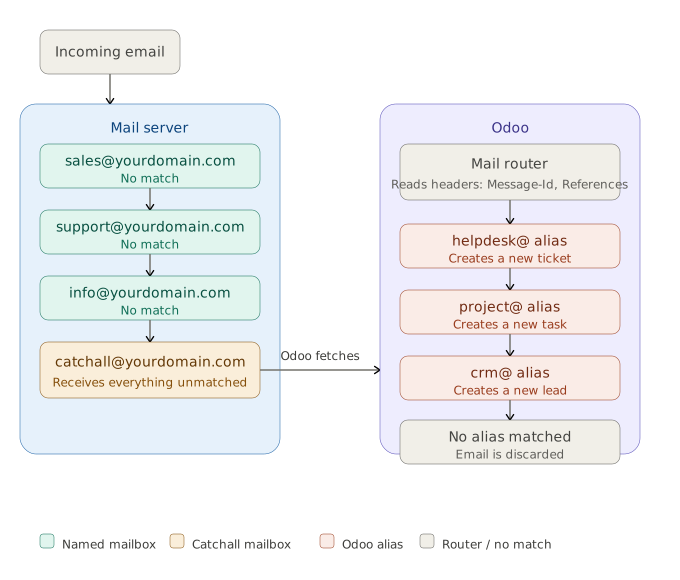
The left column shows the mail server working through its named mailboxes in sequence. Each one fails to match and the email drops through until it reaches the catchall, which accepts everything with no address of its own. Odoo's incoming mail server polls that catchall, and the mail router then takes over on the right: reading the email headers to determine where the message belongs, and dispatching it to the correct alias. Anything that doesn't match a known alias is discarded.
What it is and why it exists
When Odoo sends an email on your behalf, whether that's a sales quotation, a helpdesk reply, or a project update, it doesn't send it from the recipient's personal inbox. It sends it through a single shared email address that acts as the communications hub for your entire database. That address is the catchall.
The name reflects its original purpose in email infrastructure: a catchall mailbox is one configured to receive any email sent to a domain, regardless of whether the specific address before the "@" actually exists. If your domain is example.com and someone sends a message to anything@example.com, a catchall mailbox will receive it even if anything@ was never formally created. Odoo uses this same principle to its advantage.
In a typical Odoo setup, the catchall address looks something like catchall@yourdomain.com or, on Odoo.sh, catchall@yourcompany.odoo.com. It is the address that appears in the Reply-To header of outgoing emails when no more specific alias applies.
The role it plays in outgoing email
When a user sends a message from a record in Odoo (a customer order, a support ticket, a project task), the system sends that email via the configured outgoing mail server. The From field typically shows the user's name, but the Reply-To is set to either a specific alias (like support@yourdomain.com) or, when no alias is defined for that record type, the catchall address.
This design means that your customers and contacts always reply to an address that Odoo actively monitors. Their reply goes into the catchall mailbox, Odoo picks it up, and routes it back to the correct record in the system. The result is the threaded conversation history you see in the chatter of every record.
The role it plays in incoming email
When someone replies to an email sent by Odoo, their reply is sent to the catchall address. From there, the Odoo mail router uses parameters from the email headers, including Message-Id, References, and X-Odoo-Objects, to route the message to the correct record in the database. Odoo
This is why the catchall address must be actively monitored by an incoming mail server configured in Odoo. If Odoo cannot fetch messages from it, replies from customers simply disappear.
If Odoo receives a message directly to the catchall address without it being tied to a specific record already in the system, Odoo cannot determine where to place it and will discard the message. This is a common point of confusion: the catchall is not a general inbox. It is a routing mechanism, not a destination. Odoo
How aliases fit into the picture
Aliases are closely related to the catchall but serve a different purpose. Depending on the Odoo modules installed, aliases can be used in CRM, Helpdesk, or Project management to create a new record in Odoo from an incoming email. For example, a project might have the alias projecta@example.com. When an email is sent to that address, the catchall mailbox receives it, Odoo checks whether an alias matches, and if it does, automatically creates a new project task.
So the catchall mailbox is the single point of entry at the mail server level. All aliases ultimately funnel into it. Odoo does the sorting internally, after the message arrives.
When an email is sent to a contact without a configured alias on that record type, the reply address defaults to catchall@yourcompany.odoo.com because there is no alias defined for the contact model. Odoo
What "alias domain" means
In Odoo, the concept of an alias domain is central to email configuration. The alias domain is the domain portion (everything after the @) that Odoo uses when constructing alias addresses and the catchall address. All emails using an alias, whether replies, bounces, or direct sends, are sent to an address on that domain and delivered to the email server linked to that domain via its MX record. Odoo
For Odoo.sh customers, this is handled automatically using the .odoo.com subdomain. For businesses using a custom domain, the alias domain must be configured under Settings, and the mail server for that domain must be set up to redirect or forward all catchall and bounce addresses to Odoo.
The bounce address
Alongside the catchall, Odoo configures a bounce address (typically bounce@yourdomain.com). Where the catchall handles replies from real people, the bounce address handles delivery failure notifications from mail servers. Odoo uses these to track failed deliveries and update the deliverability status of contact email addresses. The two addresses serve distinct purposes and should not be conflated.
What administrators need to know
The catchall alias prefix (the part before the @) is set in Odoo's system parameters as mail.catchall.alias. On a standard installation it defaults to catchall, but it can be changed. It is generally not recommended to modify the catchall or bounce local-part unless a specific need dictates it, because doing so will affect all replies to previously sent emails. If you do need to change it temporarily (for example, to validate a mail redirection with a provider that sends a confirmation link), remember to revert it afterwards. Odoo
To ensure replies land in the correct place, enable developer mode, then navigate to Settings > Technical > System Parameters and confirm that mail.catchall.alias is set to the name of the mailbox being used for catchall.
The practical implication for administrators is this: the catchall address must exist and be accessible at your mail provider, and Odoo must have an incoming mail server configured to poll or receive messages from it. Without both of those things in place, outgoing emails will be sent successfully but customer replies will never reach the chatter.